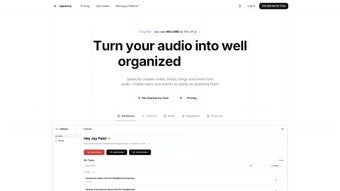

Download Speechy – AI Audio Transcription & Note‑taking Tool
Overview
Speechy is an innovative AI‑driven web application that turns spoken words into clean, organized text in seconds. Whether you’re a student capturing lecture highlights, a project manager documenting meeting minutes, or a content creator drafting blog outlines, Speechy streamlines the entire workflow from raw audio to actionable items. By simply uploading an audio file or recording live notes, the platform automatically generates accurate transcripts, todo‑lists, and structured notes.
With support for more than 100 languages, Speechy caters to a truly global audience, ensuring that language barriers never hinder productivity. The subscription‑based model provides continuous updates, secure cloud storage, and priority support, making it a reliable partner for both individual users and teams. In addition to transcription, Speechy’s smart parsing engine identifies key phrases, dates, and action items, instantly converting them into editable checklists or calendar events.
This eliminates the tedious manual step of copying and pasting, allowing you to focus on higher‑order tasks like analysis, decision‑making, and creative work. The tool’s intuitive interface requires no technical expertise—just speak, click, and let the AI do the rest. By integrating seamlessly with popular productivity suites such as Google Workspace, Microsoft 365, and Notion, Speechy fits naturally into existing workflows, boosting efficiency without demanding a steep learning curve.
Key Features & Benefits
- Automatic Transcription: High‑accuracy speech‑to‑text conversion powered by state‑of‑the‑art deep learning models.
- Multilingual Support: Over 100 languages and dialects, with automatic language detection for mixed‑language recordings.
- Smart Todo Extraction: AI identifies action items and creates editable checklists or task cards.
- Live Recording Mode: Capture notes on the fly during meetings or lectures without the need for pre‑recorded files.
- Export Options: Export transcripts as .txt, .docx, .pdf, or directly push to Google Docs, Evernote, and Notion.
- Secure Cloud Storage: Encrypted storage ensures your data remains private and compliant with GDPR and CCPA.
- Integrations & API: Connect Speechy with Zapier, Slack, and other automation tools for seamless workflow automation.
- Continuous Updates: Monthly AI model improvements guarantee higher accuracy and new language additions.
- Collaboration Features: Share transcripts with team members, add comments, and assign tasks directly within the platform.
- Affordable Subscription Plans: Tiered pricing for freelancers, small teams, and enterprises, all with a 14‑day free trial.
Beyond the raw feature list, Speechy delivers tangible productivity gains. Users report a 40‑60 % reduction in time spent on manual note‑taking, and the AI’s ability to surface key points from long recordings means you never miss an important detail. The platform’s clean UI, combined with keyboard shortcuts and drag‑and‑drop organization, ensures that even non‑technical users can get up and running within minutes.
For remote teams, the real‑time collaboration pane allows multiple participants to view, edit, and comment on a transcript simultaneously, fostering a shared understanding of meeting outcomes. Moreover, the built‑in analytics dashboard tracks usage patterns, offering insights into which topics generate the most action items, helping managers allocate resources more effectively. In short, Speechy is not just a transcription service—it’s a comprehensive knowledge‑management hub that transforms spoken content into structured, searchable, and actionable information.
Installation, Usage & Compatibility
Getting Started – No Download Required
Speechy is a cloud‑based web application, which means there is no traditional installation process. To begin, visit the official website, create an account, and verify your email address. After logging in, you’ll be greeted by a dashboard where you can either upload pre‑recorded audio files (MP3, WAV, AAC) or start a live recording session using your device’s microphone. The interface is responsive, adapting smoothly to desktop browsers (Chrome, Firefox, Edge, Safari) as well as mobile browsers on Android and iOS.
Step‑by‑Step Workflow
- Upload or Record: Click “New Transcription,” select your file, or press the microphone icon to begin live capture.
- Select Language (Optional): If the automatic detection misidentifies the language, manually choose from a dropdown list of supported languages.
- Process: Speechy’s AI engine processes the audio in the cloud; most files under 30 minutes finish within a few seconds.
- Review & Edit: The generated transcript appears in an editable pane. Use built‑in tools to highlight, add comments, or correct errors.
- Extract Tasks: Click “Generate Todo List” to let the AI pull out actionable items. Review the list and assign due dates or assignees.
- Export or Share: Choose an export format or share directly to integrated platforms (Google Drive, Slack, Notion).
Compatibility
Since Speechy runs entirely in the browser, it is compatible with any modern operating system that supports up‑to‑date browsers. This includes:
- Windows 10, 11
- macOS Ventura and later
- Linux distributions with recent Chromium‑based browsers
- Android 8.0+ (Chrome, Firefox)
- iOS 13+ (Safari, Chrome)
The platform also offers a lightweight mobile‑optimized view, ensuring that you can capture ideas on the go without sacrificing accuracy. For power users, an API key can be generated from the account settings, allowing developers to embed Speechy’s transcription capabilities into custom applications, internal tools, or third‑party services.
Pros, Cons & Frequently Asked Questions
Pros
- High‑accuracy transcription across 100+ languages.
- No software download; works directly in the browser.
- Automatic todo‑list generation saves time.
- Robust security with end‑to‑end encryption.
- Seamless integrations with popular productivity suites.
- Scalable pricing suitable for freelancers to enterprises.
Cons
- Requires a stable internet connection for cloud processing.
- Subscription model may deter occasional users.
- Limited offline functionality (no desktop client).
- Advanced features (API access, bulk processing) only in higher‑tier plans.
- Audio with heavy background noise may need manual correction.
FAQ
How accurate is Speechy’s transcription?
Speechy leverages state‑of‑the‑art deep neural networks that consistently achieve 95 % word‑level accuracy on clear speech. Accuracy can drop slightly with heavy accents or noisy environments, but the platform provides easy editing tools to quickly correct any errors.
Can I use Speechy on my mobile device?
Yes. Speechy’s responsive web app works on Android and iOS browsers. The mobile view includes a simplified recording interface and the same AI processing power as the desktop version.
Is my data safe and private?
All audio files and generated transcripts are encrypted both in transit (TLS 1.3) and at rest (AES‑256). Speechy complies with GDPR, CCPA, and ISO‑27001 standards, ensuring that your information remains confidential.
What file formats does Speechy accept?
Speechy supports the most common audio formats, including MP3, WAV, AAC, OGG, and FLAC. Larger files are processed in chunks to maintain speed and reliability.
Is there a free trial or a free tier?
New users receive a 14‑day free trial with unlimited transcription minutes. After the trial, you can choose a subscription plan that fits your usage pattern, or continue with a limited free tier that allows up to 30 minutes of transcription per month.
Conclusion & Call to Action
Speechy stands out as a versatile, AI‑powered solution for anyone who regularly works with spoken content. By converting audio into structured notes, todo‑lists, and searchable transcripts, it eliminates the manual bottleneck that traditionally plagues meetings, interviews, and brainstorming sessions. The web‑based delivery model ensures instant access from any device, while robust security and multilingual support make it suitable for global teams. Although a subscription is required for full functionality, the productivity gains—often measured in saved hours each week—justify the investment for freelancers, educators, and enterprises alike. If you’re ready to replace tedious typing with a smart, secure, and scalable tool, click the button below to start your free trial and experience how Speechy can transform your workflow.
Start Your Free Trial TodayPros: Accurate transcription, multilingual, no download, strong integrations.
Cons: Requires internet, subscription cost for heavy users.



.png)



